
INSPECT THE RESULT · FRAMELIFTER
Virtual staging before and after. Look beyond the furniture.
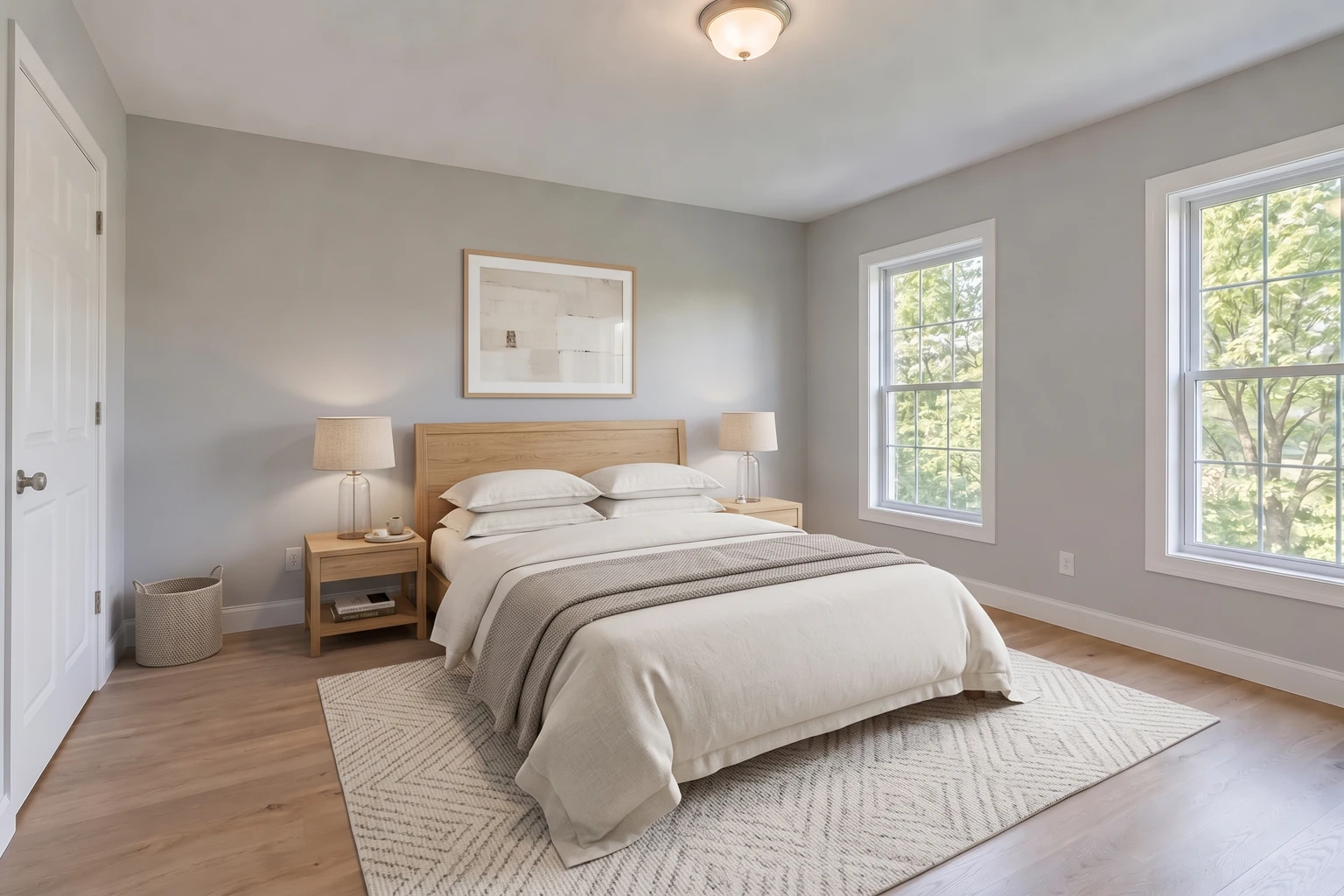
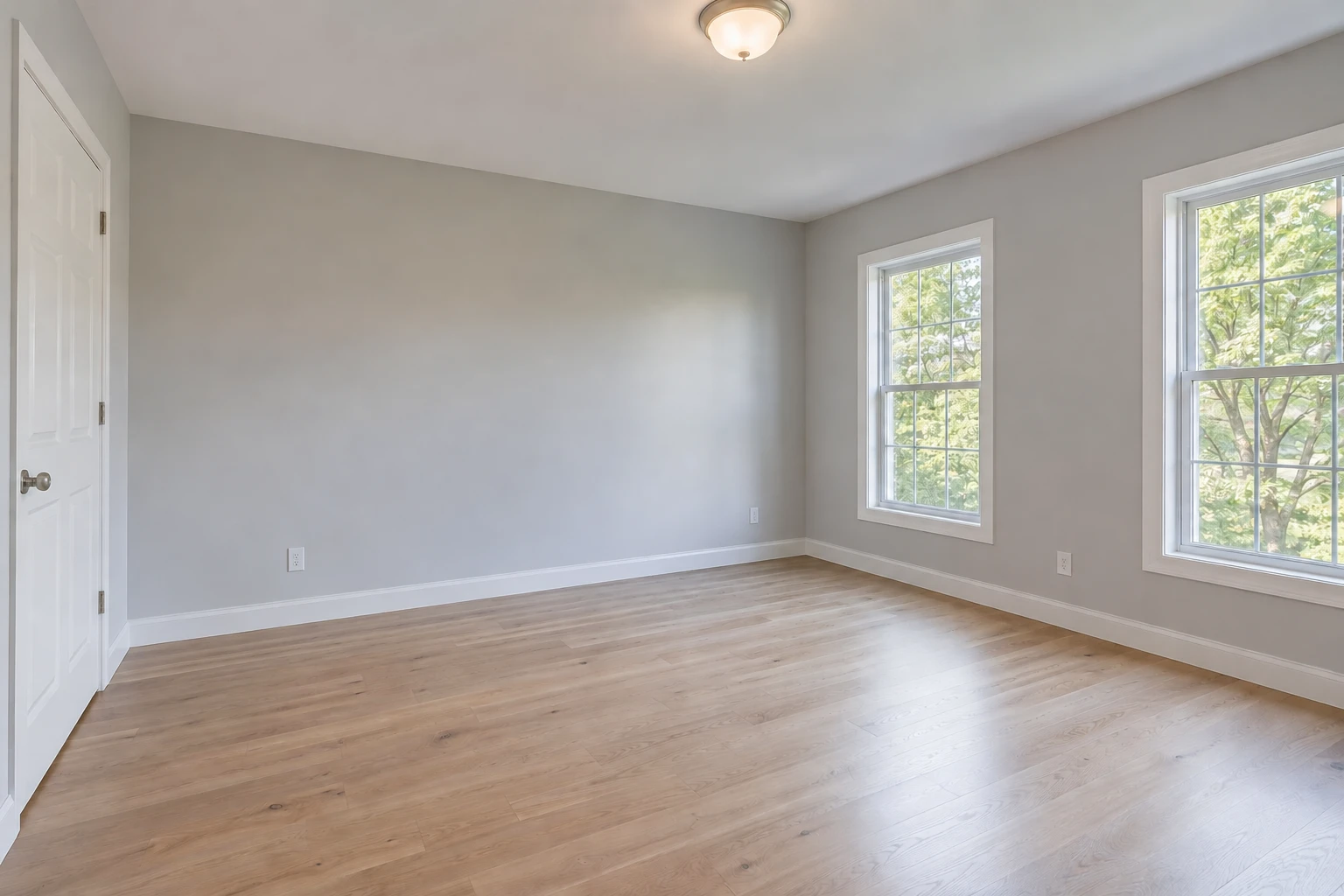
A bed helps explain an empty room, but a good staging result also respects the room around it. Compare this example, check the fixed features, and use the same review on your own listing.
A CLOSER LOOK · FRAMELIFTER
Editing fixes the photo. Staging adds furniture.
Drag across the bed and then the windows. Furniture is the intended change; the room’s architecture and view should stay consistent. Keep the empty-room original alongside a disclosed staged image.
- Furniture gives the empty room a possible use
- Doors, windows and access must remain clear
- Digital furnishings are not included with the property
Free watermarked enhancement preview. No account or credit card needed. Virtual staging is a separate step from the enhancement preview.
Three places to look before calling a result finished
1. The edges of the room
Switch between the original and staged views. Compare both windows, the closet door, baseboards and ceiling. Furniture is the intended addition; a new opening, altered view or missing fixed feature needs correction.
2. The furniture and walking space
Check that the bed and nightstands have plausible proportions and that doors and circulation remain clear. A photograph cannot verify real-world dimensions, so use measured room dimensions and a floor plan when planning an actual furniture layout.
3. The floor, light and small details
Inspect visible floorboards around the rug, furniture contact points, lamp shapes and shadows. A result that looks convincing as a thumbnail can still have distracting artifacts at full size. Reject a version that changes the property’s condition or conceals a defect.
Start with a useful empty-room photo
Choose a sharp, level frame that shows the floor, walls and access points. Remove portable clutter before shooting and use even light when possible. Keep your full-size original; repeated screenshots and heavy compression make detail harder to assess.
This example uses a generated bedroom so the demonstration can be clearly separated from customer work. The finished edit came from FrameLifter’s staging engine. It is an example of the workflow, not a promise that every room will produce the same arrangement.
Review and disclose before publishing
Staging review
0 of 5For a furnished vacation rental, guests need to see the furniture they will actually receive. Use photo editing instead of staging when the job is to improve exposure and color in an already furnished space.
See the cost before starting your listing
FrameLifter’s paid workflow starts with enhancement. One finished photo costs $1.99; listings start at $9.99. Staging is optional and purchased separately from the gallery.
One or two staging edits cost $4.99 each. Three cost $11.99, then each extra room in the same staging purchase adds $2.99. Use the staging cost calculator to include enhancement and staging together.
Questions about the before and after
Is this an actual FrameLifter staging result?
Yes. The empty room is an AI-generated demonstration source, not a customer property. The furnished version was produced with FrameLifter’s production staging engine. It has been resized and compressed for the web; furniture was not added by a separate design service.
Will my room look exactly like this?
No. The furniture, placement and lighting depend on your source and the generated result. Use this example to understand the task, then review your own photo at full size before publishing.
Should I include the empty-room photo too?
Keep the original and clearly identify the digitally added furniture. Check the current requirements of your MLS or listing platform for labels and original-photo pairing. The staged image illustrates a possible arrangement, not furnishings included with the property.
What does FrameLifter staging cost?
Staging is purchased separately after enhancement: $4.99 each for one or two rooms, $11.99 for three, then $2.99 per additional room in the same staging purchase. Enhancement starts at $1.99 for one photo.