
BY FRAMELIFTER · Updated
Virtual Staging vs Photo Editing: Which Does Your Listing Actually Need?
These two get lumped together constantly, and they solve completely different problems. Photo editing fixes how a real room was captured. Virtual staging adds furniture that isn't there. Confusing them means either paying for staging you didn't need, or shipping photos of an empty room when what the listing actually needed was a couch.
A CLOSER LOOK · FRAMELIFTER
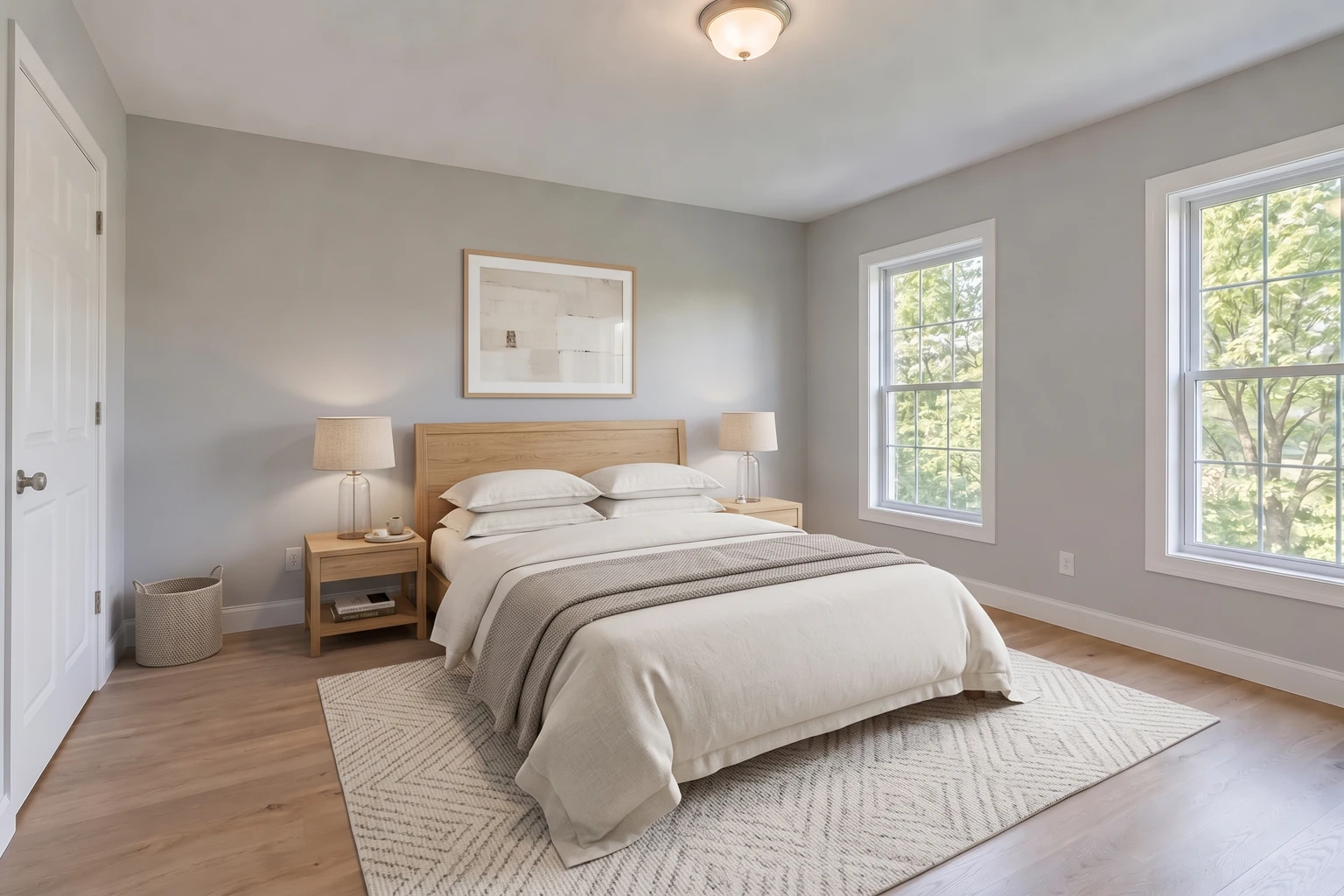
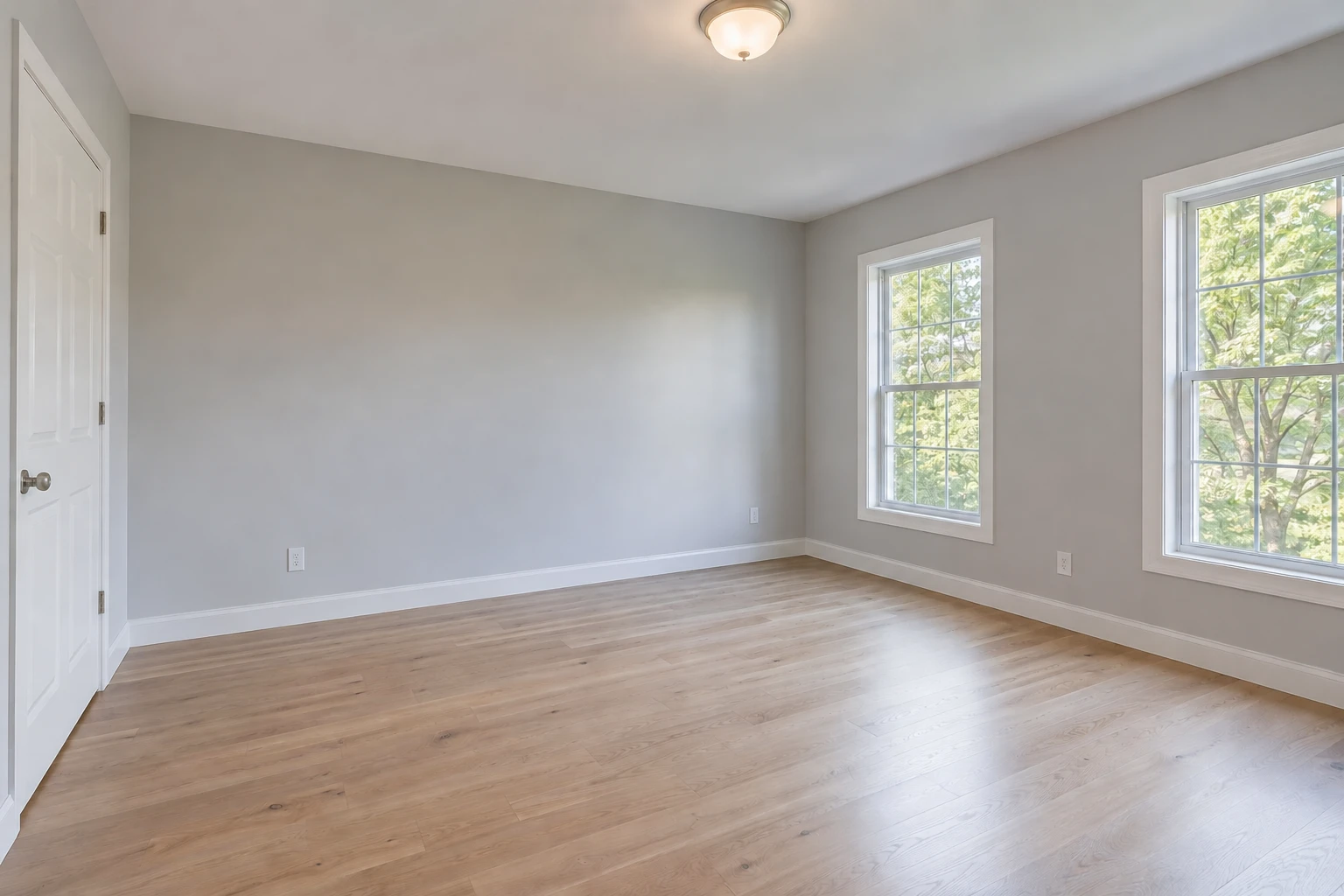
Editing fixes the photo. Staging adds furniture.
Drag across the bed and then the windows. Furniture is the intended change; the room’s architecture and view should stay consistent. Keep the empty-room original alongside a disclosed staged image.
- Furniture gives the empty room a possible use
- Doors, windows and access must remain clear
- Digital furnishings are not included with the property
Free watermarked enhancement preview. No account or credit card needed. Virtual staging is a separate step from the enhancement preview.
Jump to a section
Two different jobs
Photo editing corrects the capture: exposure, color, contrast and modest perspective. It should leave the property recognizable and accurately represented. Optional cleanup and sky replacement go beyond a basic lighting correction and need separate consideration.
Virtual staging adds digital furniture and decor to a photograph. It helps illustrate a possible room arrangement; it does not document furniture present at the property. Label the result appropriately and keep the original available.
When You Need Virtual Staging
Staging solves one specific problem: an empty or nearly-empty room. Empty rooms photograph worse than furnished ones for a concrete reason — without furniture to establish scale, buyers struggle to judge how a couch and coffee table would actually fit, and empty rooms tend to read smaller and colder in photos than they do in person. A dining room with no table is hard to picture as a dining room at all.
This is common with vacant listings — the sellers have already moved out, investment properties that were never furnished for living, new construction that's move-in ready but has zero furniture, or a property manager who wants rental listing photos without paying for a physical staging crew. In all of these cases there's no real furniture to correct or enhance. Exposure and color editing can still help an empty room; staging is the separate step that illustrates a furniture arrangement.
Compare a virtual staging before-and-after to inspect the added furniture and compare the room’s fixed features. Check the lighting as well; a staging result can change more than the objects you intended to add.
When photo editing is the better fit
If the room is already furnished and the composition works, start by correcting light and color. Check the original for usable detail: completely white windows or motion blur cannot be reliably repaired into factual detail.
FrameLifter offers a free watermarked standard enhancement so you can compare your own photo. Start with a free preview of your own photo. Cleanup, sky replacement and Day to dusk are separate optional edits.
When both can help
An empty room can need exposure correction and staging. Begin with a clear, well-balanced source, then add a suitable furniture arrangement. Review the final image as a whole; some staging services also adjust the light, so do not assume every tool uses the same sequence.
In FrameLifter, virtual staging is a separate paid choice. Inspect door and window placement, floor and wall materials, furniture scale and circulation space before using a result.
Disclosure and property accuracy
Check the rules of the destination before publishing an altered image. Your MLS or platform may specify how staging is labeled and whether the original must appear alongside it. There is no single disclosure rule for every market or every type of edit.
Do not assume that calling a change “photo editing” makes it exempt. Changing a view, hiding a defect or removing a permanent feature can misrepresent the property. For a furnished short-term rental, show what guests will actually receive rather than substituting imagined furniture.
A useful default is to retain the original, clearly identify digital furnishings and avoid changes to the property’s actual condition. Confirm the destination’s current requirements before publishing.
Where Staging Can Backfire
Staging sets expectations, and overdone staging sets the wrong ones. Furniture scaled slightly small makes a room look bigger than it is — a queen bed rendered to look like it leaves generous walking space on both sides, when a real queen bed would fill most of the floor. Buyers who tour the empty space afterward notice the gap between the photo and the room immediately, and that first impression is hard to undo once they're standing in it.
The safer approach is staging furniture sized and placed the way real furniture would actually sit in the space — proportioned to the room, not to make the photo more impressive. Disclosed, accurately scaled staging helps buyers picture the space. Staging that oversells the room creates a worse showing than an honest empty photo would have.
How to Decide
- Room is empty or nearly empty: virtual staging. See virtual staging for how it works on your own listing photos.
- Room is furnished but photos look dark, dull, or color-shifted: photo editing. Start with real estate photo enhancement .
- Vacant listing, want it to look move-in ready: both — edit the base photo first, then stage it.
- Publishing staged photos anywhere on the MLS: check your board's disclosure rules and label the photo before it goes live.
Frequently asked questions
What is the difference between virtual staging and photo editing?
Photo editing corrects the capture, such as exposure and color. Staging adds digital furnishings. Other scene changes, such as sky replacement or cleanup, should be considered separately from basic correction.
Do I need staging for an already furnished room?
Usually the first question is whether the photo needs better light, color or composition. Adding furniture is a different task and may not address the issue.
Do staged photos need a label?
Check the current rules of your MLS or platform for required wording, placement and original-image requirements. Keep the distinction between real and digital furnishings clear.
Can I use both editing and staging?
Yes. Start with a usable, well-balanced source and review the complete staged result. Services differ in whether lighting correction is included.
Is virtual staging included in the free enhancement preview?
No. FrameLifter’s free watermarked preview is for standard photo enhancement. Virtual staging is a separate paid choice.